ssh command in macOS
- Price
- Free, part of macOS
- macOS
- Included in macOS
- Two-factor
- Yes: Keys, keyboard-interactive (OTP)
- Automatic connect
- Not listed
- Simultaneous connections
- Yes: Several forwards and sessions
- Other VPN types
- None
If you can log in to a server with SSH, you can tunnel through it. macOS includes the ssh command, but no app to manage tunnels. These are your options.
An SSH login can do more than open a shell. It can carry other connections through the encrypted session, which is why SSH tunnels are often called an “SSH VPN”. Local port forwarding makes a service behind the server, such as a database or an admin page, reachable on a port on your Mac. Remote forwarding works the other way round, and a SOCKS proxy lets apps that support proxies send their traffic through the server.
You don’t need a VPN server for this, just an SSH account on a server that allows port forwarding. The trade-off: an SSH tunnel isn’t a full VPN. Only apps that use a forwarded port or the SOCKS proxy go through it. Most tools on this page forward ports; sshuttle comes closest to a VPN by routing whole subnets. The differences are in how much you do in Terminal, whether tunnels reconnect on their own, and whether you can use other VPN types in the same app.
SSH tunnels are a quick way to reach services behind a server, but they work differently from a VPN:
From the built-in command to menu bar apps. All of them use the standard SSH protocol, so nothing needs to be installed on the server except for sshuttle, which needs Python there.
| App | Price | macOS | Two-factor | Automatic connect | Simultaneous connections | Other VPN types |
|---|---|---|---|---|---|---|
| Built into macOS | ||||||
| ssh command in macOS | Free, part of macOS | Included in macOS | Yes: Keys, keyboard-interactive (OTP) | Not listed | Yes: Several forwards and sessions | None |
| Free and open source | ||||||
| sshuttle | Free, open source (LGPL) | Command line; needs Python | Same as your ssh setup | Not listed | Yes | None |
| Tunnel manager apps | ||||||
| Core Tunnel | Free for 1 host; Premium from $9.99/yr | macOS 15 and newer | Yes: Keys; OTP with authenticator apps | Yes: At launch; reconnects after sleep | Partial: Free: 1 host; Premium: unlimited | None |
| Secure Pipes | Free; Pro $39.99 one-time | macOS 12 and newer | Yes: Keys, OTP, FIDO2 | Yes: At launch; auto-reconnect | Partial: Free: 2 per type; Pro: unlimited | None |
| Multi-protocol apps | ||||||
 Shimo
Our app
Shimo
Our app
|
€39 once · 7-day trial | macOS 13 and newer | Password or key file | Yes: Wi-Fi, location, apps | Yes | 11 more, incl. OpenVPN and WireGuard |
Details as of October 2026, taken from each vendor’s own website and documentation. All trademarks belong to their owners.
macOS includes the OpenSSH command-line client. In Terminal, ssh -L and ssh -R forward ports, and ssh -D starts a SOCKS proxy; settings can be saved in ~/.ssh/config, and the UseKeychain option stores key passphrases in the macOS Keychain. There is no user interface: each tunnel is a Terminal command that has to keep running, and reconnecting after sleep or a network change is up to you.
sshuttle is an open-source command-line tool (LGPL 2.1) that its developers describe as a “poor man’s VPN”. Instead of forwarding single ports, it sends TCP traffic and DNS for whole subnets through an SSH login, so it comes closest to a real VPN. It needs root on your Mac and Python on the server, it doesn’t carry UDP on macOS, and it doesn’t reconnect on its own.
Core Tunnel by Codinn is a menu bar app for SSH tunnels, built on OpenSSH, with local, remote and dynamic forwarding, ProxyJump and Keychain storage. Tunnels can connect when the app launches and are restored after network interruptions or sleep. One host is free; unlimited tunnels need a Premium license, sold for one or more years or as a lifetime purchase. It requires macOS 15 or newer.
Secure Pipes is a macOS app for SSH local and remote forwarding and SOCKS proxies, relaunched as version 2 in autumn 2026. It connects at launch, reconnects automatically and shows logs and traffic per connection, and it answers one-time-code prompts from the server. The free version allows two active connections per type; a one-time Pro license for the current major version removes the limit. It needs macOS 12 or newer.
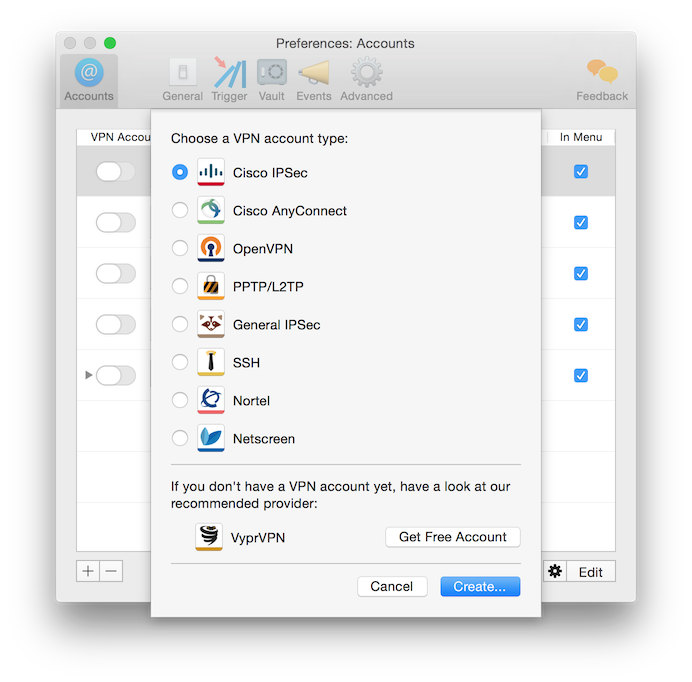
Shimo is a VPN client for the Mac by Jäger Apps. It connects to twelve VPN types from the menu bar, including OpenVPN, WireGuard, IPsec and the common company SSL VPNs, and keeps several connections active at the same time. Triggers connect accounts automatically by Wi-Fi network, location or running app, credentials are stored in the macOS Keychain, and a connection history with CSV export helps with billing. A license costs €39 once per user and covers all of your Macs.
If you’re comfortable in Terminal, ssh -L or ssh -D does the job at no cost. You don’t need an app for this.
Routes TCP and DNS for entire networks through SSH, if you can run it with root rights and the server has Python.
Dedicated tunnel managers with auto-reconnect and free tiers for a few tunnels.
Keep SSH tunnels, OpenVPN, WireGuard and company SSL VPNs in one menu bar app, with triggers and a connection history.
Not quite. A VPN routes all or selected traffic of your Mac. An SSH tunnel forwards specific ports or offers a SOCKS proxy, so only apps that use them go through it.
No. Shimo uses the standard SSH protocol, so any SSH server that allows port forwarding for your account works.
Yes. Choose your private key file when you add the SSH account.
Yes, if you allow it. Shimo can make forwarded ports available to other devices on your local network.
No. A Shimo license is a one-time payment of €39 per user, for all of your Macs.
Every feature is included in the trial. If you keep Shimo, you pay once.