VPN client for Mac

Cisco Secure Client (AnyConnect) on Mac

Cisco’s SSL VPN, formerly called AnyConnect, is one of the most common company VPNs. You usually get a portal address and a company login.

Cisco VPN on the Mac: what to know

Cisco Secure Client, formerly AnyConnect, is the VPN client for Cisco’s Secure Firewall and ASA gateways. Your company licenses it from Cisco, and you usually get it from your IT department or the gateway’s web portal, together with a portal address and your company login.

Other apps such as OpenConnect, VPN Tracker and Shimo can connect to the same gateways. That helps if you work with several companies, or want all your VPNs in one app. Before you switch, check two things: whether your company requires checks that only Cisco’s app performs, and how you sign in. Shimo supports username, password and one-time codes, but not yet Cisco’s web-based single sign-on (SAML).

What you’ll get from your admin or provider

  • Portal addressFor example vpn.company.com.
  • Company username and passwordOften the same as your work account.
  • Group or connection profileOnly if your company offers more than one.
  • Second factorA one-time code, a token, or a web sign-in.
Before you switch

Your company may require Cisco’s own app

Other apps can connect to the same gateway, but some setups only work with Cisco Secure Client. Ask your IT team first if any of these apply:

  • Posture checks run on your Mac before it may connect
  • IT requires an always-on VPN
  • Your company uses additional Secure Client modules
  • You sign in through a web page (SAML single sign-on), which Shimo doesn’t support for Cisco yet

Your options on a Mac

Grouped by kind, from Cisco’s own app to multi-protocol apps.

Your options on a Mac
App Price macOS Two-factor Automatic connect Simultaneous connections Other VPN types
Official vendor app
Cisco Secure Client Licensed by your company macOS 15 to 27 listed (5.1) Yes: SAML SSO, certificates, OTP tokens Yes: Trusted networks, Always-On (set by IT) No, one gateway at a time IPsec/IKEv2 to Cisco gateways
Free and open source
OpenConnect Free, open source (LGPL) Command line; no version list Yes: TOTP, SecurID, YubiKey, SAML Not listed Not listed GlobalProtect, Fortinet, Ivanti, F5, more
Multi-protocol apps
VPN Tracker 365 Shimo vs VPN Tracker From €84 per year macOS 11 to 26 listed Not listed for AnyConnect Partial: DNS domain-based, higher plans Partial: Higher plans only OpenVPN, WireGuard, IPsec, Fortinet, more
Shimo Our app €39 once · 7-day trial macOS 13 and newer Partial: One-time codes, tokens; no SAML yet Yes: Wi-Fi, location, apps Yes 11 more, incl. Fortinet and GlobalProtect

Official vendor app

Cisco Secure Client

Price
Licensed by your company
macOS
macOS 15 to 27 listed (5.1)
Two-factor
Yes: SAML SSO, certificates, OTP tokens
Automatic connect
Yes: Trusted networks, Always-On (set by IT)
Simultaneous connections
No, one gateway at a time
Other VPN types
IPsec/IKEv2 to Cisco gateways

Free and open source

OpenConnect

Price
Free, open source (LGPL)
macOS
Command line; no version list
Two-factor
Yes: TOTP, SecurID, YubiKey, SAML
Automatic connect
Not listed
Simultaneous connections
Not listed
Other VPN types
GlobalProtect, Fortinet, Ivanti, F5, more

Multi-protocol apps

VPN Tracker 365

Price
From €84 per year
macOS
macOS 11 to 26 listed
Two-factor
Not listed for AnyConnect
Automatic connect
Partial: DNS domain-based, higher plans
Simultaneous connections
Partial: Higher plans only
Other VPN types
OpenVPN, WireGuard, IPsec, Fortinet, more
Shimo vs VPN Tracker

Shimo Our app

Price
€39 once · 7-day trial
macOS
macOS 13 and newer
Two-factor
Partial: One-time codes, tokens; no SAML yet
Automatic connect
Yes: Wi-Fi, location, apps
Simultaneous connections
Yes
Other VPN types
11 more, incl. Fortinet and GlobalProtect
  • Yes
  • Not listed by the vendor
  • Partial or limited

Details as of October 2026, taken from each vendor’s own website and documentation. All trademarks belong to their owners.

Your options explained

Cisco Secure Client

Cisco Secure Client, formerly AnyConnect, is Cisco’s own VPN and endpoint security client for Cisco Secure Firewall and ASA gateways. Companies license it from Cisco, and employees usually get it from their IT department or the gateway’s web portal. It supports SAML single sign-on, certificates and one-time codes, and offers optional modules such as posture checks that other apps can’t provide. Automatic connection on untrusted networks and Always-On VPN are configured by IT.

OpenConnect

OpenConnect is a free, open-source client (LGPL 2.1) for Cisco AnyConnect gateways that also supports GlobalProtect, Fortinet, Pulse Secure / Ivanti, Juniper, F5 and Array Networks VPNs. On macOS the project provides a command-line tool, and a separate graphical front end, OpenConnect-GUI, exists. It supports one-time codes, SecurID and YubiKey tokens, certificates and SAML login in an external browser. Shimo uses OpenConnect under the hood for its SSL VPN connections.

VPN Tracker 365

VPN Tracker 365 by equinux is a VPN client for Mac, iPhone and iPad, sold as an annual subscription from €84 per year. It supports Cisco AnyConnect alongside OpenVPN, WireGuard, IPsec, Fortinet, GlobalProtect and SonicWall gateways, among others. Simultaneous connections and AutoConnect are reserved for higher plans, and teams can share connections through TeamCloud.

Shimo

Shimo is a VPN client for the Mac by Jäger Apps. It connects to twelve VPN types from the menu bar, including OpenVPN, WireGuard, IPsec and the common company SSL VPNs, and keeps several connections active at the same time. Triggers connect accounts automatically by Wi-Fi network, location or running app, credentials are stored in the macOS Keychain, and a connection history with CSV export helps with billing. A license costs €39 once per user and covers all of your Macs.

Which option fits you?

IT requires posture checks or always-on VPN

Recommendation Cisco Secure Client

Use the app your IT team provides. Other apps can’t meet these requirements.

You sign in through a web page (SSO)

Recommendation Cisco Secure Client or OpenConnect

Shimo doesn’t support Cisco’s web-based single sign-on yet. Both of these do.

Consultant with several company VPNs

Recommendation Shimo

Connect to Cisco, Fortinet and GlobalProtect gateways from one app, at the same time.

VPN should start on its own

Recommendation Shimo

Triggers connect by Wi-Fi network, location, running apps or other VPN connections, without help from IT.

Set up Cisco AnyConnect in Shimo

  1. 1 Install ShimoDownload the free trial and open Shimo from the menu bar.
  2. 2 Add a Cisco AnyConnect accountEnter the portal address and your company username.
  3. 3 Sign inPick your group if asked and enter your one-time code. Credentials go into the macOS Keychain.
  4. 4 Connect, or add a triggerConnect from the menu bar, or let Shimo connect when you leave the office network.
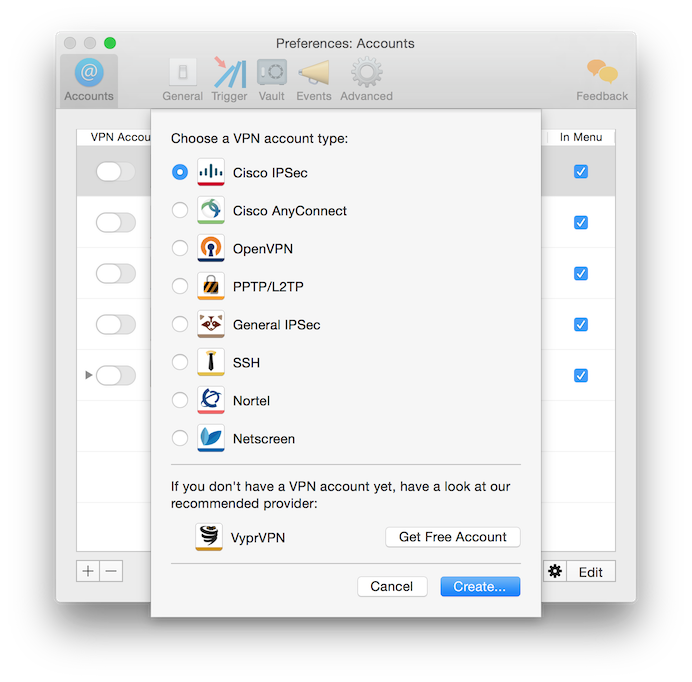
Shimo’s “Add VPN Profile” window listing the supported VPN types

Frequently asked questions

Is AnyConnect the same as Cisco Secure Client?

Yes. Cisco renamed AnyConnect to Cisco Secure Client. Gateways and portal addresses stay the same.

Does Shimo support Cisco single sign-on (SAML)?

Not yet. Shimo supports logins with username, password and one-time codes or tokens. If your company signs in through a web page, for example with Microsoft or Okta, use Cisco Secure Client for now.

Do I need permission from IT?

We recommend asking. Some companies only allow Cisco’s own app, as described above.

Can I connect to Cisco and another company VPN at once?

Yes. Every Shimo license supports simultaneous connections with any mix of VPN types.

Is Shimo a subscription?

No. A Shimo license is a one-time payment of €39 per user, for all of your Macs.

Try Shimo free for 7 days

Every feature is included in the trial. If you keep Shimo, you pay once.